Three Tabs, Three Different Rules
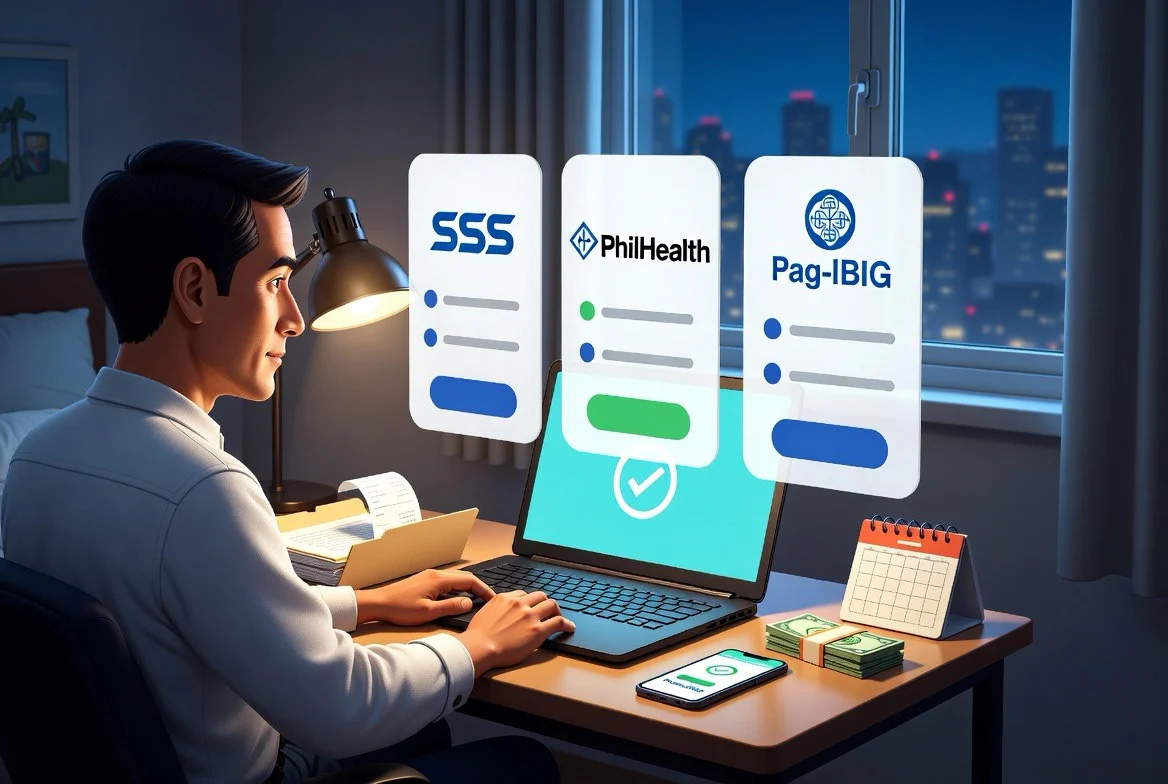
You open three tabs: My.SSS, PhilHealth, and Virtual Pag-IBIG. All three are government payments. All three matter. But they do not speak the same language.
One asks for a PRN or contribution period. One now asks self-paying members to generate a Statement of Premium Account before payment. One can mean Regular Savings, MP2, Housing Loan, Multi-Purpose Loan, or Calamity Loan depending on the button you click.
From abroad, the easy mistake is to send money to someone in the Philippines and hope they “take care of it.”
Hope is not a payment system. For OFWs, the real goal is not just paying. It is paying the right agency, for the right covered period, through an official channel, with proof you can still find two years later.
Jump to what you need:
- Pay the agency, not a person
- Gather your IDs before paying
- SSS: start with the PRN
- PhilHealth: generate the SPA first
- Pag-IBIG: choose the right payment type
- Build a 10-minute receipt trail
- When money is tight
- Five common payment mistakes
- Yearly reset checklist
This is educational, not financial, legal, tax, health-benefit, or government-benefit advice. Rates, deadlines, covered periods, payment partners, and portal rules can change. Always verify inside the official agency portal before paying.
Pay the Agency, Not a Person
The first rule is simple: pay the agency through an official portal, official payment page, or accredited collecting partner. Do not pay a stranger, “contribution helper,” fixer, or personal GCash/Maya/bank account because someone says they can update your record faster.
That sounds obvious until you are tired after work, the portal is slow, and a relative says, “Send it to me, ako na lang.” A family member can help you physically pay, but the system should still be yours:
- you know the member number or account number being used;
- you know the covered period;
- you know the payment type;
- you receive the official receipt or reference number;
- you log in later and confirm the payment posted.
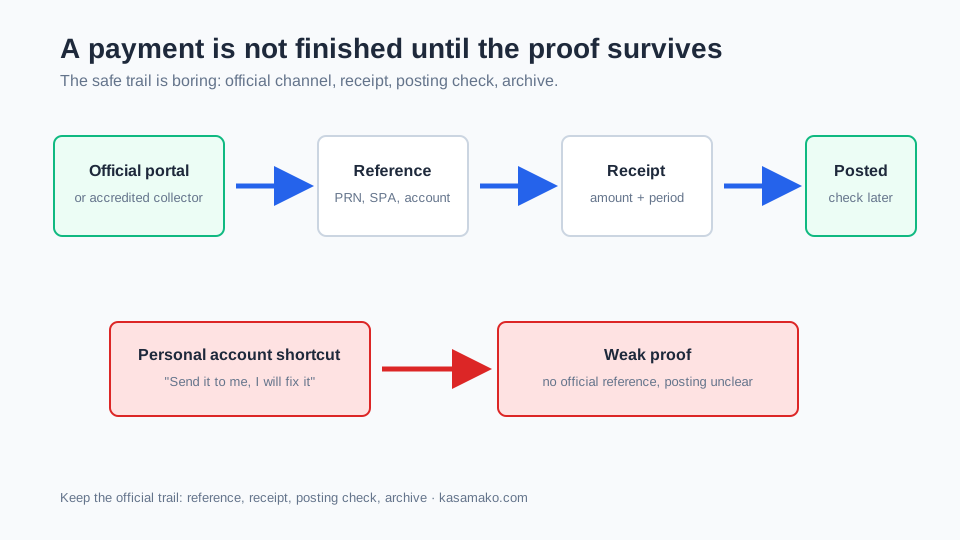
PhilHealth’s 2026 SPA notice specifically tells members to transact only with authorized PhilHealth-accredited collecting agents and avoid sharing the generated SPA with unauthorized people (PhilHealth). That principle is useful across all three agencies: payment help is fine; losing control of your login, OTP, reference, or receipt trail is not.
Gather Your IDs Before Paying
Most payment mistakes start before the payment page. Before your next payday, make one private checklist. Do not post it in a group chat. Keep it somewhere secure:
- SSS number or CRN, plus My.SSS access;
- PhilHealth Identification Number or PIN, plus Member Portal or SPA access;
- Pag-IBIG MID number, plus Virtual Pag-IBIG access;
- MP2 account number, only if you already enrolled in MP2;
- housing loan or short-term loan account number, only if you are paying a loan;
- current email and mobile number for recovery;
- a private folder for receipts.
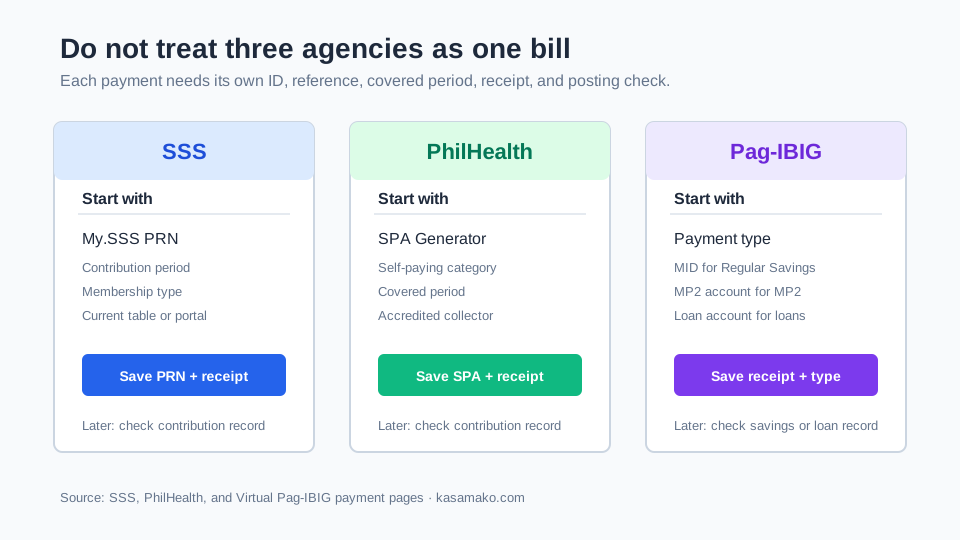
The key is not memorizing every government rule. The key is knowing which identifier belongs to which transaction. Your Pag-IBIG MID is not your MP2 account number. A PhilHealth SPA is not an SSS PRN. A housing loan account is not Regular Savings. Mix those up, and the money may leave your wallet cleanly but land in the wrong bucket.
SSS: Start With the PRN
For SSS contributions, start with the Payment Reference Number, or PRN.
SSS says its electronic collection system uses PRNs for contribution payments and that individually paying members, including OFWs and voluntary members, should use My.SSS to obtain PRNs before paying through SSS-accredited collecting partners (SSS Pay Contributions). Its OFW page gives the practical flow: log in, open the PRN tab for contributions, enter the membership type, applicable period, and amount, then generate and review the PRN before paying (SSS OFW Member).
Do not copy a contribution amount from an old blog post, a Facebook comment, or last year’s screenshot. The correct amount depends on your member category, monthly salary credit, applicable period, and current schedule; SSS’s contribution page is the place to check before paying (SSS Pay Contributions).
For land-based OFWs, SSS states that contributions may be paid during the applicable year using a PRN through My.SSS and accredited payment channels; it also lists deadlines for January-September and October-December applicable months on its contribution page. Sea-based OFWs are different: the SSS OFW page says their contributions are remitted by employers or manning agencies (SSS OFW Member).
That difference matters. If you are sea-based, do not assume you should pay like a land-based individual member. Check your employment setup and SSS record.
Before you click pay, answer five questions:
- Is this the official My.SSS PRN for contributions, not a loan PRN?
- Is the membership type correct?
- Is the covered period correct?
- Is the contribution amount based on the current SSS table or portal, not memory?
- Will the payment channel accept PRN payments and give you a receipt?
SSS maintains a payment-channel list for employers, individual members, OFW members, and all payors, including online, mobile, partner-bank, and overseas-partner options (SSS Payment Channels). Partner lists change, so check the page before relying on an old screenshot.
PhilHealth: Generate the SPA First
For PhilHealth, the 2026 rule to remember is SPA first.
PhilHealth announced that beginning April 1, 2026, self-paying members must generate a Statement of Premium Account, or SPA, before paying. The policy covers self-earning individuals, professional practitioners, and Overseas Filipinos, excluding sea-based migrant workers (PhilHealth).
This is not just a formality. PhilHealth says the SPA is meant to reduce payment-processing errors, help payments post faster, and keep contribution records accurate. The generated SPA contains key payment details and can be presented to a PhilHealth Local Health Insurance Office cashier or PhilHealth-accredited collecting agent.
PhilHealth’s Online Services page lists the Member Portal for records, contributions, MDR, and online premium payment, plus an SPA Generator (PhilHealth Online Services). PhilHealth also publishes accredited collecting agents, including overseas and online collection schemes (PhilHealth Collecting Partners).
PhilHealth’s UHC explainer places migrant workers under Direct Contributors and says Direct Contributors should continue paying to keep coverage active and use benefits when needed (PhilHealth UHC). The exact premium basis can depend on current rules and your member category, so let the official SPA and portal do the calculation.
Before you pay PhilHealth from abroad, answer:
- Am I self-paying, employer-paid, land-based, or sea-based?
- Did I generate a current SPA for the right period?
- Does the SPA show the correct member details?
- Am I paying through an LHIO cashier, the Member Portal, or an accredited collecting agent?
- Did I save the SPA and the payment confirmation?
If someone tells you, “No need SPA, just send me the amount,” pause.
Pag-IBIG: Choose the Right Payment Type
Pag-IBIG is where a lot of OFWs click the wrong button.
Virtual Pag-IBIG’s Pay Online page separates payment options into Regular Savings, MP2 Savings, Housing Loan, Housing Loan Processing Fee, Multi-Purpose Loan, and Calamity Loan (Virtual Pag-IBIG Pay Online). Those are not interchangeable.
Regular Savings is the mandatory contribution bucket. MP2 is voluntary savings. A housing loan payment is debt repayment. A Multi-Purpose Loan or Calamity Loan payment is a different loan record.
The payment fields show the difference. Regular Savings asks for a Pag-IBIG MID number (Regular Savings payment page). MP2 asks for an MP2 Savings Account No. (MP2 payment page). Housing loans ask for a Housing Account No. (Housing Loan payment page).
That is the whole lesson: the right agency is not enough. The right payment type matters too.
Virtual Pag-IBIG also shows Local/Overseas membership category choices, payment methods, covered period fields for savings payments, and convenience-fee fields before the total amount due. Check every field before confirming.
MP2 deserves extra clarity. It can be useful for some members, but it is not required, not the same as Regular Savings, and not financial advice from Kasamako. If you use MP2, verify your own eligibility and account details through Pag-IBIG.
Build a 10-Minute Receipt Trail
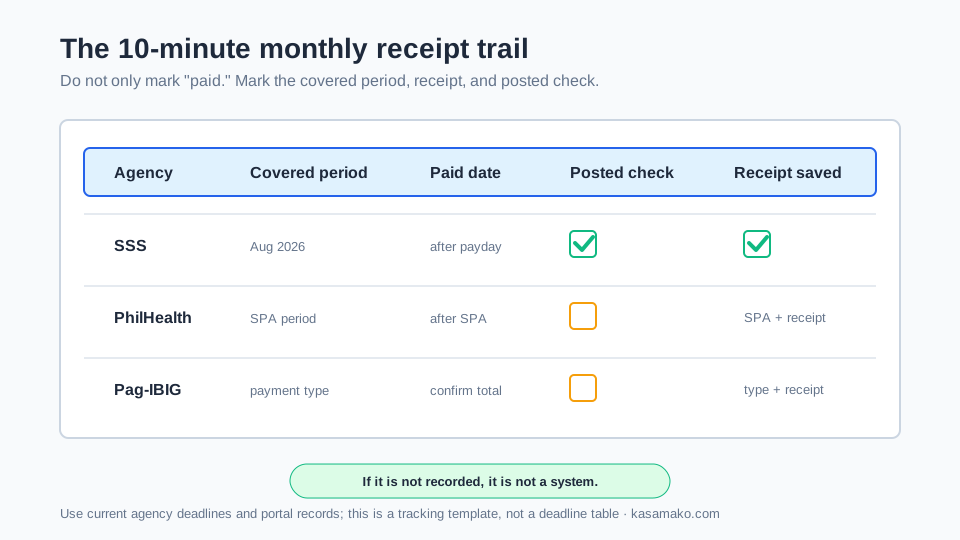
Payment is not done when the money leaves your wallet. Payment is done when you can prove what you paid and later see that it posted or was accepted correctly. Set one monthly reminder:
| Agency | What to record |
|---|---|
| SSS | PRN, covered period, amount, payment channel, receipt/reference, posting check date |
| PhilHealth | SPA number or file, covered period, amount, collecting agent/channel, receipt/reference, posting check date |
| Pag-IBIG | Payment type, MID/MP2/loan account last 4 digits, covered period if applicable, amount, convenience fee, receipt/reference, posting check date |
Use boring filenames:
2026-08-sss-contribution-prn-1234-paid.pdf
2026-08-philhealth-spa-5678-paid.pdf
2026-08-pagibig-regular-savings-mid-9012-paid.pdf
2026-08-pagibig-mp2-acct-3456-paid.pdf
Do not save full member numbers in filenames. Use last four digits or a private code. Keep receipts in a folder you control, not only in a chat thread.
Worked Example: One Payday, Three Clean Records
Example only: Lea is an OFW in Dubai. On the first Sunday after payday, she opens her official accounts.
For SSS, she generates the contribution PRN for her period, checks the amount, pays through a listed channel, saves the receipt, and checks posting later. For PhilHealth, she generates the SPA, pays through an official or accredited channel, and saves both SPA and confirmation. For Pag-IBIG, she chooses Regular Savings, MP2, or the correct loan option before paying.
The order can change. The discipline stays the same: correct reference, correct period, official channel, saved proof, posting check.
When Money Is Tight
Do not let anyone give you a universal ranking like “always pay SSS first” or “always pay Pag-IBIG first.” Life is not that clean.
Triage with records:
- Is there an active loan due date or penalty risk?
- Is your PhilHealth category current, and do you or your dependents need coverage clarity soon?
- Are you close to an SSS deadline or trying to avoid a contribution gap?
- Are you paying Regular Savings, a loan, or optional MP2?
- Is this payment coming from your future-you budget or from money needed for rent, food, or family emergencies?
If money is tight, optional payments should not disguise themselves as mandatory payments. MP2 is not Regular Savings. A top-up is not a loan amortization. A relative’s business request is not a government contribution.
This is where the family ATM guide connects. Your future-you line items need a budget before the padala, not leftover coins after every request.
Overseas cards, e-wallets, remittance routes, and convenience fees can change the real amount. If you move money home first and then pay locally, read the hidden remittance fees guide so the route itself does not quietly skim the budget.
Five Common Payment Mistakes
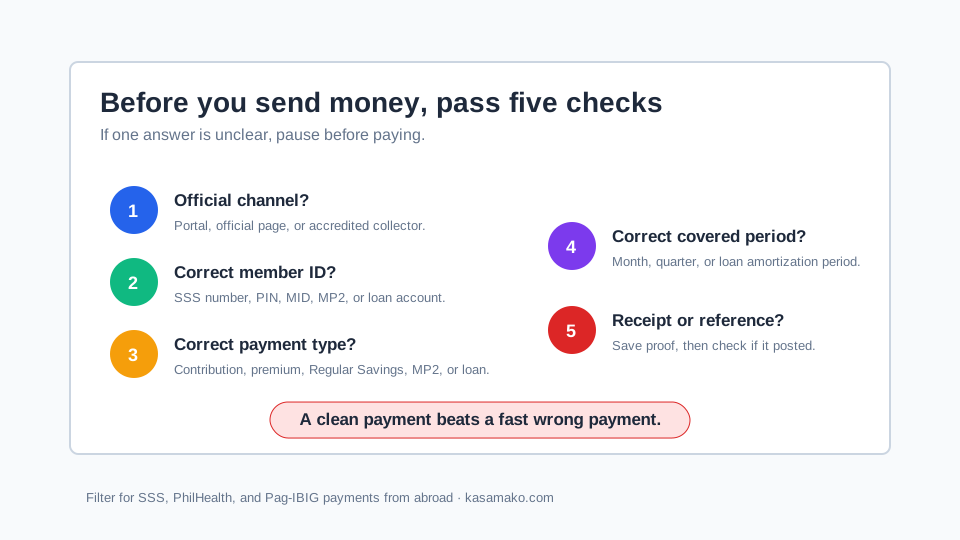
1. Paying the right agency but the wrong product. Pag-IBIG Regular Savings, MP2, housing loan, and short-term loan payments are different. Read the button before you send money.
2. Using stale contribution numbers. SSS and PhilHealth rules can change. Generate the current PRN or SPA and check the official table or portal.
3. Assuming “money deducted” means “record posted.” Your wallet can show paid while the member record still needs time or correction. Log in later.
4. Letting another person control the login. Help is fine. Giving away passwords, OTPs, full IDs, or private receipts is not.
5. Keeping proof only in chat. Chat histories get deleted, accounts get locked, phones get lost. Save receipts in a private folder with a boring filename.
Yearly Reset Checklist
Once a year, preferably every January or before contract renewal, run this reset:
- Log in to My.SSS, PhilHealth, and Virtual Pag-IBIG.
- Confirm email, phone, recovery details, and member category.
- Download current records, hiding full IDs if you store screenshots.
- Review SSS deadlines, PhilHealth SPA rules, and Pag-IBIG payment types.
- Check payment partners, convenience fees, loan balances, and old saved billers.
- Update your receipt folder structure for the new year.
Before returning home for good, do the same reset again. A clean government-payment file will not magically create income, but it removes one set of administrative surprises during a hard transition. If you are planning that move, pair this with the 90-day return-home runway guide.
FAQ
Can my family pay for me in the Philippines?
Yes, but keep control of the record. Give only the exact official reference or payment details needed for the transaction, not your password or OTP. Ask for the official receipt, then log in later to confirm the payment posted.
Can I pay missed months?
Do not assume yes. SSS says late contribution payments for individually paying members such as self-employed, voluntary, non-working spouse, and OFW members are not allowed, so missed months can remain payment gaps under its rules (SSS Pay Contributions). PhilHealth and Pag-IBIG have their own rules by category and payment type. Check the official portal or office before planning a catch-up payment.
Which should I pay first: SSS, PhilHealth, or Pag-IBIG?
There is no universal order. Check loan due dates, health coverage needs, member category, deadlines, missed periods, and whether a payment is mandatory or optional. If you are unsure, ask the agency directly instead of guessing from comments.
Is MP2 required for OFWs?
No. On Virtual Pag-IBIG’s Pay Online page, MP2 is labeled as voluntary savings, while Regular Savings is the mandatory contribution option (Virtual Pag-IBIG Pay Online). MP2 may fit some members, but it is optional and should be checked against your own situation.
What if the portal is down?
Wait, try another browser if the official page suggests it, or use official contact channels and accredited partners. Do not use a random “portal fixer” because the site is slow.
Do I still need paper receipts?
Keep digital receipts at minimum. For big or disputed payments, paper or printed copies can help. The proof should show agency, member/account reference, covered period or payment type, amount, date, and transaction reference.
What Kasamako Is Building
Kasamako is being built for the paperwork side of OFW life: contract checks, recruiter red flags, money trails, document reminders, and simple systems that make hard decisions less lonely.
This article is the manual version. A future tool could turn it into a private checklist: when to generate a PRN, when to generate an SPA, when to check posting, and which receipt is missing. No one needs another product pitch. OFWs need fewer loose papers and fewer “I thought it was paid” surprises.
If you want to know what ships next, join the early-access list. No spam, no selling your data.
Sources and a Word About Me
The sources behind this piece:
- SSS Pay Contributions - contribution table guidance, PRN use, payment deadlines, and real-time processing context
- SSS OFW Member - OFW coverage, land-based and sea-based treatment, PRN generation steps, and OFW payment channels
- SSS Payment Channels - official payment-channel list for SSS payors
- PhilHealth UHC explainer - Direct Contributor context, including migrant workers
- PhilHealth SPA Generator notice - April 1, 2026 SPA requirement for self-paying members and security reminders
- PhilHealth Online Services and PhilHealth Collecting Partners - Member Portal, SPA Generator, and accredited collecting-agent references
- Virtual Pag-IBIG and Virtual Pag-IBIG Pay Online - online Pag-IBIG services and separate payment options
- Virtual Pag-IBIG Regular Savings, MP2, and Housing Loan payment pages - payment fields and payment-type separation
Related reading:
- OFW Investment Guide: Where to Put Your Savings in 2026 - compare options for savings beyond your contribution obligations without confusing different account types.
- The 3 Hidden Fees in Every Philippines Remittance Service - if you move money home before paying, check the full transfer cost
- OFW Lifestyle Inflation: How to Stop Being the Family ATM - put future-you payments in the budget before every request eats the month
- OFW Returning Home: The 90-Day Job Gap No One Plans For - clean records matter even more before the overseas salary stops
Kasamako (in development): Join the early-access waitlist
I’m building Kasamako because OFWs deserve clear answers about their own money and documents. I’m a software developer, not a lawyer, financial adviser, tax adviser, health-benefit adviser, government employee, or representative of SSS, PhilHealth, or Pag-IBIG. This article is educational, not financial, legal, tax, health-benefit, or government-benefit advice. Agency rules, contribution tables, payment partners, portals, and fees change; verify current details directly before paying.
No affiliate links. No paid placements. No one here is selling a savings product, insurance policy, loan, or payment service.
Bayaran nang tama, itago ang resibo, saka i-check kung posted. Ingat lagi.
Comments
You can also email team@kasamako.com. Email is private and is not posted as a comment.